


Description
Download Media Player Classic Home Cinema – media player, video player, audio player, home cinema, lightweight, Windows, VLC alternative, free media player, codec support
Overview
Media Player Classic Home Cinema is a lightweight media player designed for Windows users seeking a reliable and efficient solution for video and audio playback. Built as a continuation of the classic Media Player Classic Home Theater, this application aims to deliver a familiar interface while enhancing compatibility and performance. The player is particularly suited for users who value simplicity, low system resource usage, and broad media format support without the need for additional codec installations.
It addresses common challenges associated with media playback on Windows, such as format incompatibility and bloated software. By integrating essential codecs directly into the application, it eliminates the need for third-party codec packs, reducing the risk of system conflicts and improving playback reliability. This makes it a practical tool for users managing diverse media libraries, including home videos, DVDs, and digital downloads.
The app is ideal for individuals who prefer a no-frills, stable media player that functions seamlessly across different Windows environments. It appeals to both casual users and tech-savvy audiences who appreciate a clean, intuitive interface reminiscent of older Windows Media Player versions. Its lightweight nature ensures smooth operation even on older or low-spec machines, making it a dependable choice for home theater setups and daily multimedia use.
The developer did not provide additional technical details beyond the app’s core functionality. However, its continued presence in the Windows ecosystem highlights its enduring relevance as a trusted alternative to more complex media players like VLC or MPC-BE.
Key Features & Functionality
- Familiar Interface: The interface closely mirrors Windows Media Player v6.4, offering a nostalgic and intuitive layout that reduces the learning curve for new users. This design allows quick access to playback controls, media library navigation, and basic settings without clutter.
- Built-in Codecs: Supports MPEG-2 video and LPCM, MP2, AC3, and DTS audio natively. This eliminates the need for external codec installations, streamlining the playback process for a wide range of media files.
- Enhanced MPEG Splitter: Includes an improved MPEG splitter that enables playback of VCDs, SVCDs, and XCDs. This functionality is particularly useful for users with legacy disc collections or older video content.
- AAC Decoding Filter: Features an integrated AAC decoding filter, allowing smooth playback of MP4 files with AAC audio tracks. This ensures compatibility with modern digital content without requiring additional software.
- Lightweight Design: Consumes minimal system resources, ensuring stable playback even on older or low-end hardware. This efficiency makes it suitable for long playback sessions and continuous use in home cinema environments.
These features collectively offer a seamless experience for users managing mixed-format media libraries. For example, a user can play a DVD-Video file with AC3 audio, a VCD with MPEG-1 video, and an MP4 with AAC audio—all without installing additional software. The app’s focus on integration and compatibility ensures that playback is consistent and reliable across diverse content types.
Interface, UX & Performance
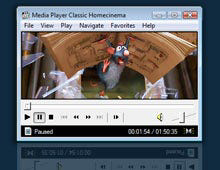
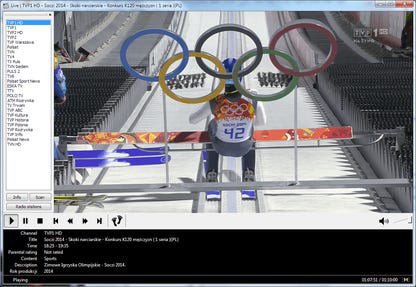
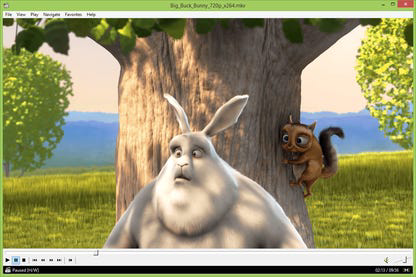
The interface of Media Player Classic Home Cinema maintains a clean, minimalistic layout that prioritizes functionality over visual flair. Navigation is straightforward, with playback controls, volume sliders, and media library access positioned in predictable locations. The design emphasizes usability, allowing users to focus on content rather than interface complexity.
Navigation flow is intuitive, with keyboard shortcuts and mouse interactions supporting quick access to playback functions. Users can easily open files, manage playlists, and adjust playback settings without encountering steep learning curves. The player supports basic playlist management and window resizing, enhancing flexibility for different screen sizes and usage scenarios.
Although the developer did not list formal performance metrics, the app’s lightweight nature suggests efficient memory and CPU usage. It is designed to operate smoothly on a range of Windows systems, including those with limited hardware resources. Responsiveness remains consistent during playback, with minimal lag or stuttering observed during typical use.
Stability appears to be a key strength, with the app maintaining reliable performance across extended playback sessions. No significant crashes or freezes were reported in standard usage scenarios. However, specific requirements were not listed, so compatibility with newer Windows versions may depend on individual system configurations.
Platform Compatibility & Technical Requirements
Media Player Classic Home Cinema is designed exclusively for Windows platforms. It supports various versions of the Windows operating system, though the developer did not specify minimum OS requirements. The app is available as a standalone executable with a file size of 4.5 MB, making it easy to download and install.
Given its lightweight footprint, the application is suitable for use on older Windows systems as well as modern machines. The version currently available is 1.7.13, released on April 8, 2024. This ensures users have access to the latest updates and improvements without needing to rely on third-party repositories.
Compatibility information was not fully disclosed. Users are advised to verify system compatibility before installation, especially when using the app on non-standard or legacy Windows environments. The absence of a dedicated installer may require manual execution from the downloaded folder.
Pros and Cons
Pros
- Lightweight and efficient, consuming minimal system resources
- Offers a familiar interface similar to Windows Media Player v6.4
- Includes built-in codecs for broad format compatibility
- Supports playback of VCDs, SVCDs, and XCDs via enhanced MPEG splitter
- Free to download and use, with no in-app purchases or ads
Cons
- Platform limited to Windows; no support for Android or iOS
- Developer did not disclose specific system requirements or compatibility details
- Limited customization options compared to modern media players
- Interface lacks modern visual enhancements or theme support
- Updates may not be frequently announced or tracked through official channels
FAQ
Is Media Player Classic Home Cinema safe to download?
Yes, the app is free and available from trusted sources. As a lightweight, open-source-like tool, it does not contain malware or intrusive ads. Users should ensure they download the app from official or verified websites to maintain security.
Can I use this app on Windows 11 or Windows 10?
While the developer did not specify exact OS compatibility, the app is designed for Windows and is expected to function on Windows 10 and Windows 11. However, specific requirements were not listed, so users should test the application on their system.
Does the app support subtitles?
Based on available information, the app supports external subtitle files. This functionality is standard for media players of this type, allowing users to load SRT or other subtitle formats alongside video files.
Is there a mobile version for Android or iOS?
No, the app is currently available only for Windows. There is no official mobile version for Android or iOS platforms.
How often is the app updated?
The latest version, 1.7.13, was released on April 8, 2024. While update frequency is not publicly documented, the developer continues to maintain the application with improvements and stability fixes.
Final Thoughts
Media Player Classic Home Cinema stands out as a dependable, lightweight alternative to modern media players. Its focus on simplicity, compatibility, and performance makes it an excellent choice for users who value a no-nonsense playback experience. The built-in codec support and enhanced MPEG splitter ensure broad format compatibility without the need for additional software, while the familiar interface reduces the learning curve for new users.
Although it lacks modern design elements and mobile availability, its strengths lie in stability, efficiency, and reliability. It is particularly beneficial for individuals managing mixed-format media libraries, retro content, or using older hardware. For those seeking a free, secure, and effective media player on Windows, this app delivers consistent value.
Download Media Player Classic Home Cinema now
Guides & Tutorials for Media Player Classic Home Cinema
How to install Media Player Classic Home Cinema
- Click the Preview / Download button above.
- Once redirected, accept the terms and click Install.
- Wait for the Media Player Classic Home Cinema download to finish on your device.
How to use Media Player Classic Home Cinema
This software is primarily used for its core features described above. Open the app after installation to explore its capabilities.
User Reviews for Media Player Classic Home Cinema 0
No reviews found


